Table of Contents
Our Usage Rules
- Users must have a valid reservation in a system before using it.
- Users must use their own booked time and not book or use a resource with other username.
- The cell analyzers and cell sorters can be booked up to 30 days in advance.
- Users can only cancel cell analyzers 3h before the booking starting time.
- Users can only cancel cell sorters 7 days before the booking starting time.
- After the tolerance time, users can release their bookings, but this may result in a penalization.
- Consecutive independent bookings are not allowed.
Please download the detailed User Guidelines for your own reference.
Cell Analyzers
- Users must get trained on a cell analyzer before using it. Follow the Training guidelines to start using our equipment.
- Authorized trained users can access the facility 24 hours, 7 days a week.
- Users must include 15 min in their booking time for cleaning.
- Users must perform an additional cleaning before acquisition if they are the first user of the day.
- Users must record start and finish times on the system log sheet (cleaning time included) and problems (if any).
- Users that swap filters must leave the system with the default configuration.
- Users must always clean the machines after acquisition following the cleaning protocol and record the cleaning steps in the Software.
- Users must refill the sheath tank with PBS+Azide/H2O+Azide at the end of the booked session.
- If during acquisition, the waste container gets full, a high pitch sound will go off. Users should disconnect the black sensor (the noise will stop), put the cytometer in Standby, and disconnect the orange connector. The container must be replaced with a new one.
- Users must always export their data and delete it from the Software database regularly.
- Users must log out from the analyzer software at the end of their session.
- (BD LSRFortessa, LSRFortessa SORP and Fortessa X-20) Users must switch off the system if they are the last users booked or if the analyzer will not be used for at least 3h.
- (BD Accuri C6 Plus, BD FACSymphony A5 SE and Aurora) After 5pm or on weekends and holidays, users must switch off the system if they are the last users booked.
- Any negligent use of the system must be reported via Agendo (incident report), email or directly to staff.
Cell Sorters
- Users must follow the Cell Sorting guidelines to start using our cell sorters.
- The cell sorters can be booked from 10am until 6pm.
- If you need to book a sorter outside the regular working hours, please contact the Head of Facility beforehand to check staff availability.
- Users must include time in their booking for new settings, purity checks and cleaning (minimum 30 min).
- Users must mention in the booking comments the Biosafety Level (BSL) of their samples, which nozzle (70 μm, 85 μm, 100 μm or 130 μm) and which collection devices (plates, 1.5 mL tubes, 5 mL FACS tubes, 15 mL Falcon tubes or plates) they will be using.
- Before a new experiment book a meeting with our team to discuss all details. If your experiment requires a downstream application from another GIMM platform, please let us know.
Data Handling
- Users are responsible for backing up their data.
- No backup is offered in the platform computers even for short term and no responsibility can be attributed to the facility in case of data lost.
- Data is automatically deleted from the acquisition and processing PCs without further notice typically after 1 month (BD Accuri C6 Plus, BD LSR Fortessa/X-20/SORP and Cytek AMNIS ImageStream X) or 15 days (BD FACSymphony A5 SE and Cytek Aurora).
Charge Rates for 2026 - (€/hour)
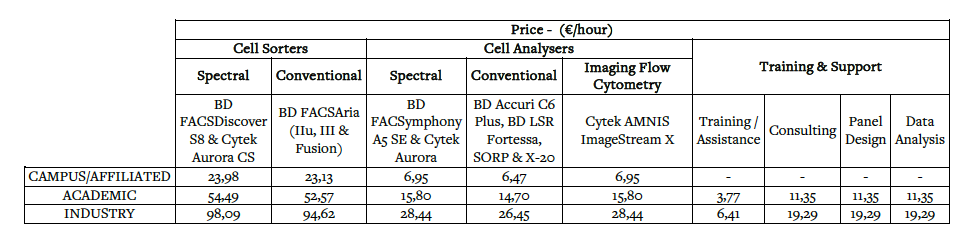
- In situations of high technical complexity, the amounts invoiced will be determined based on the records of services actually provided, as evidenced by scheduling systems and/or technical reports validated by the responsible units and confirmed by the customer.
- The values on this table can be changed with no prior warning.
- VAT to be added at the legal rate of 23% (if applicable).
- Charge rates in effect since: July 2025
To see internal prices please access the GIMM Intranet
Billing Policies
- Users will be billed according to their real usage, as long as it matches their booking time.
- Booking will be adjusted based on real usage if it extends the booking time.
- If the user starts later than their booking time, the start will not be adjusted.
LAST MINUTE CANCELLATIONS/RELEASE
- Last Minute Cancellations may result in penalties. This means: when canceling a booking after the Deletion Tolerance, which is less than 3h for analyzers, or less than 7 days for cell sorters.The penalty charge corresponds to the running cost of the system if the session is not booked by another user.
NO SHOWS/UNCONFIRMED
- The charge corresponds to the running cost of the system.
Abuse Report
If you find a user that did not comply with the above rules please contact us.