User Tools

Site Tools


oeiras_zeiss_lumar_v12

Location: [Oeiras] Room 0B03
Manufacturer: ZEISS
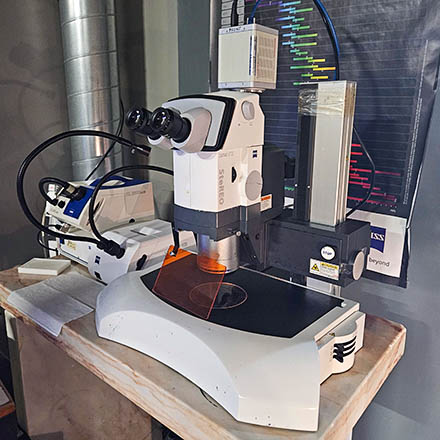
Model: Stereo Lumar V.12
Nickname: Lumar
Software: Micromanager (Hamamatsu camera) / uEye (uEye camera)
Year: 2011
SN:

Data will be deleted after: 3 months  
ZEISS Stereo Lumra.V12 Quality Control
ZEISS Stereo Lumra.V12 Usage Statistics

Microscope overview

The Stereo Lumar V.12 is a motorized stereoscope with fluorescence, capable of imaging in colour and grayscale (camera dependent), with a zoom between 9.6x and 120x.

System components

Filtersets

Position Filterset Excitation Dichroic Emission Reference
1 Cyan 426-446 nm 455 nm 460-500 nm FS47
2 Green 460-490 nm 495 nm 505-530 nm FS13
3 Red 540-580 nm 585 nm 592-667 nm FS45
4 Yellow 490-510 nm 515 nm 520-550 nm FS46

Camera

Camera can be changed on request, and training for this can be provided if needed.

Model Frame Size Pixel Size (µm) Quantum Efficiency Installed date
UI-3370CP Rev. 2 Color Camera 2048 × 2048 5.5 x 5.5 - Since Oct 2024
ORCA-Flash4.0 LT+ 2048 × 2048 6.5 x 6.5 82% Before May 5, 2025
ORCA-Flash4.0 - C11440-22C 2048 × 2048 6.5 x 6.5 82% After May 5, 2025

Pixel-size vs magnification

Magnification Hamamatsu (µm/pixel) IDS (µm/pixel)
9.6x 10.90 9.40
10.0x 10.49 9.02
20.0x 5.07 4.52
30.0x 3.41 3.02
40.0x 2.59 2.26
50.0x 2.05 1.81
60.0x 1.73 1.51
70.0x 1.49 1.30
80.0x 1.29 1.13
90.0x 1.16 1.01
100.0x 1.04 0.91
110.0x 0.95 0.83
120.0x 0.87 0.76

Microscope Turn On Procedure

  • Turn on the powerbar below the stone table.
  • If fluorescence is necessary, turn on the fluorescent lamp controller on top of the desk.

Microscope Turn Off Procedure

  • Turn on the powerbar below the stone table.
  • If fluorescence was used, turn off the fluorescent lamp controller on top of the desk.
    • This lamp has to be on for 30 minutes. If you use the system less than 30 minutes, wait until that time to turn the lamp off, or warn the Bioimaging Team.

Back to the Equipment page

oeiras_zeiss_lumar_v12.txt · Last modified: 2026/02/17 18:02 by bioimaging