
User Tools
Table of Contents

|
Location: [Oeiras] Room 0B05 |
 Andor Dragonfly SDC Quality Control
 Andor Dragonfly Usage Statistics
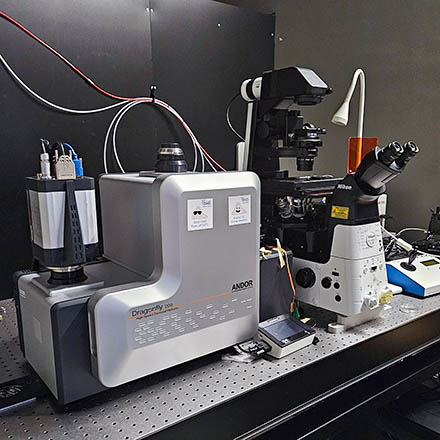
![[Oeiras] Room 0B05](/facility/bioimaging/lib/exe/fetch.php?media=bartolomeu_dias_wing_2025_-_dragonfly.png)
Microscope overview
 Spinning disk confocal microscopy (SDC) is a technique well suited for observation of cells and organoids. Compared to conventional widefield microscopy, SDC provides instant optical sectioning, allowing the imaging of cells and shallow tissues (typically a maximum of a few tens of micrometres deep) in 3D.
Compared to laser scanning confocal microscopes (such as Leica Stellaris, ZEISS Airyscan), the Dragonfly SDC provides much faster acquisition (up to 400 fps, with limited ROI (2048×128), 40 fps full frame), with lower phototoxicity and photobleaching.
A spinning disk with multiple small pinholes is installed between the light source and specimen to generate point-like illumination covering the whole area “simultaneously”. Each small aperture serves as a detecting pinhole to remove out-of-focus fluorescence.
This system was built to be versatile, and allow imaging of different sample sizes. It includes both high and low magnification objectives (which require different pinhole sizes, 25 or 40um).
The scanhead allows 1x or 2x magnification (for extra magnification and to allow Nyquist sampling and deconvolution - see table below).
Spinning disk confocal microscopy (SDC) is a technique well suited for observation of cells and organoids. Compared to conventional widefield microscopy, SDC provides instant optical sectioning, allowing the imaging of cells and shallow tissues (typically a maximum of a few tens of micrometres deep) in 3D.
Compared to laser scanning confocal microscopes (such as Leica Stellaris, ZEISS Airyscan), the Dragonfly SDC provides much faster acquisition (up to 400 fps, with limited ROI (2048×128), 40 fps full frame), with lower phototoxicity and photobleaching.
A spinning disk with multiple small pinholes is installed between the light source and specimen to generate point-like illumination covering the whole area “simultaneously”. Each small aperture serves as a detecting pinhole to remove out-of-focus fluorescence.
This system was built to be versatile, and allow imaging of different sample sizes. It includes both high and low magnification objectives (which require different pinhole sizes, 25 or 40um).
The scanhead allows 1x or 2x magnification (for extra magnification and to allow Nyquist sampling and deconvolution - see table below).
- Microscope: Nikon Ti2 Eclipse
- Confocal scanner: Andor Dragonfly 200
- Camera: Andor Sona-4BV11
 Data files older than 1 month will be automatically deleted on this system, please copy your data to the GIMM server using the desktop link.
System components
LASERs
| LASER | Wavelength | Maximum Power | Measured after objective @ 100% |
|---|---|---|---|
| Violet | 405 nm | 100 mW | 7 mW |
| Blue | 488 nm | 100 mW | 17 mW |
| Yellow-Green | 561 nm | 100 mW | 20 mW |
| Red | 640 nm | 100 mW | 17 mW |
Objectives
| Magnification | Model | Immersion | NA | WD (mm) | Max FoV (1600x1350px) | ideal CSU pinhole | Pixel Size (zoom 1x) | PFS Compatible | Reference |
|---|---|---|---|---|---|---|---|---|---|
| 10x | CFI Plan Fluor | Air | 0.30 | 16 | 1.3 mm | 25 μm | 1.0561 μm | Yes | MRH00105 |
| 20x | CFI Plan Apochromat | Air | 0.8 | 0.8 | 0.68 mm | 40 μm | 0.5097 μm | Yes | MRD70270 |
| 40x | CFI Plan Apochromat λD | Air | 0.95 | 0.21 | 0.34 mm | 40 μm | 0.2580 μm | Yes | MRD70470 |
| 60x | CFI Plan Apochromat VC | Water | 1.2 | 0.28-0.31 | 0.23 mm | 40 μm | 0.1719 μm | Yes | MRD07602 |
Upon request:
| Magnification | Model | Immersion | NA | WD (mm) | Max FoV (1600x1350px) | ideal CSU pinhole | Pixel Size (zoom 1x) | PFS Compatible | Reference |
|---|---|---|---|---|---|---|---|---|---|
| 20x | CFI Plan Fluor | 0.75 | multi | 0.33-0.51 | 0.68 mm | 25 μm | 0.5097 μm | No | MRH07241 |
| 40x | CFI Apochromat LWD λS | 1.15 | Water | 0.59-0.61 | 0.34 mm | 40 μm | 0.2580 μm | Yes | MRD77410 |
| 100x | CFI Plan Apochromat λD | 1.45 | Oil | 0.13 | 0.13 mm | 40 μm | 0.1038 μm | Yes | MRD71970 |
Emission Filters Spinning Disk
| Position | Filter name | Dichroic | Transmission |
|---|---|---|---|
| 0 | QUAD | 405/488/561/640 | 445 nm |
| 521 nm | |||
| 594 nm | |||
| 698 nm | |||
| 1 | 405 | 405/488/561/640 | 422-468 nm |
| 2 | 488 | 405/488/561/640 | 502-540 nm |
| 3 | 561 | 405/488/561/640 | 573-616 nm |
| 4 | 637 | 405/488/561/640 | 660-724 nm |
| 5 | Pol | – | – |
| 8 | 561 extra | 405/488/561/640 | 574-638 nm |
Turn On Procedure
- Turn on power bar #1.
- Turn on power bar #2.
- Turn on the LASER key
- Turn on the incubation power bar (if you are planning on using the incubator and/or CO2).
- Turn on the computer.
- Log in Windows with your Agendo credentials.
- Start the Fusion software
If the system is already on:
- Log in Windows with your Agendo credentials.
- Start the Fusion software
Turn Off Procedure
If there is another user in the next hour:
- Close Fusion
- Log off the computer
- Clean up immersion objectives
Else:
- Close Fusion
- Turn off the computer
- Turn off the incubation controller (if used)
- Switch the LASER key off
- Turn off power bars #1 and #2
- Clean up immersion objectives


