
User Tools
This is an old revision of the document!
Table of Contents

|
Location: [Oeiras] Room 0B16 |
 Agilent Cytation 5 Quality Control
 Agilent Cytation 5 Usage Statistics
Microscope overview
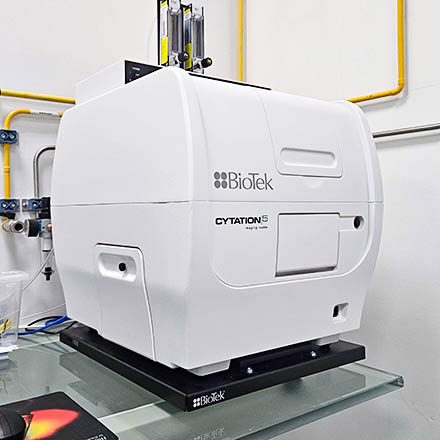
The Cytation 5 Cell Imaging Multimode Reader is a fully automated plate and slide reader equipped with an inverted widefield configuration.
This unit is capable of imaging from 4-40x with fluorescence and/or brightfield (mono or RGB). It is equipped with three different excitation LEDs and filter sets (there is a fourth slot which is mainly used for hardware-based autofocus, but which can be replaced by a 4th fluorescence channel upon request).
It is also equipped with an atmosphere control unit for regulating CO2 concentration (for live cell imaging), and capable of setting up for hypoxia conditions also. The multimode detection modules include filter- and monochromator-based fluorescence detection, luminescence, and UV-Vis absorbance detection.
System Components
LEDs
| Line | Wavelength | Reference |
|---|---|---|
| UV | 385 nm | 1225007 |
| B | 465 nm | 1225001 |
| G | 523 nm | 1225003 |
| Y | 590 nm | 1225002 |
| R | 623 nm | 1225005 |
Filtersets available
| Position | Filterset | Excitation | Dichroic | Emission | Reference |
|---|---|---|---|---|---|
| 1 | LASER Autofocus | - | - | - | 1225010 |
| 2 | DAPI | 352-402 nm | 409 nm | 417-477 nm | 1225100 |
| - | GFP | 453-488 nm | 497 nm | 505-545 nm | 1225101 |
| 3 | Propidium Iodide | 511-551 nm | 605 nm | 619-676 nm | 1225111 |
| - | Texas Red | 579-594 nm | 605 nm | 619-676 nm | 1225102 |
| 4 | Cy5 | 608-648 nm | 660 nm | 665-705 nm | 1225105 |
Objectives
| Magnification | Model | Immersion | NA | WD (mm) | Reference |
|---|---|---|---|---|---|
| 4x | Plan-Semiapochromat Fluorescence | Air | 0.13 | 17 | UPLFLN4X |
| 20x | Plan-Semiapochromat Fluorescence | Air | 0.45 | 6.60-7.80 | LUCPLFLN20X |
| 40x | Plan-Semiapochromat Fluorescence | Air | 0.6 | 2.70-4.00 | LUCPLFLN40X |
Camera
| Model | Frame Size | Pixel Size (µm) | Quantum Efficiency |
|---|---|---|---|
| FLIR Chameleon3 CM3-U3-50S5M (mono) | 2448 × 2048 | 3.45 x 3.45 | 69% (at 525 nm) |
Pixel Size
Images coming from the Cytation 5 are not calibrated, even though the system has that information available. In the images' metadata you can find the PixelWidth and the ImageWidthMicrons, and by dividing the latter for the first, you get the Pixel Size to calibrate your images. You can find this information below, per objective and Field Of View (FOV):
| Objective | FOV | Image Size (pixels) | Image Size (microns) | Pixel Size (microns) |
|---|---|---|---|---|
| 4x | Full | 1992 x 1992 | 3474 x 3474 | ~1.7440 x ~1.7440 |
| 4x | 75% | 1496 x 1496 | 2609 x 2609 | ~1.7440 x ~1.7440 |
| 4x | Standard | 1224 x 904 | 2135 x 1576 | ~1.7443 x ~1.7434 |
| 20x | Full | 1992 x 1992 | 694 x 694 | ~0.3484 x ~0.3484 |
| 20x | 75% | 1496 x 1496 | 521 x 521 | ~0.3483 x ~0.3483 |
| 20x | Standard | 1224 x 904 | 427 x 315 | ~0.3489 x ~0.3485 |
| 40x | Full | 1992 x 1992 | 347 x 347 | ~0.1742 x ~0.1742 |
| 40x | 75% | 1496 x 1496 | 260 x 260 | ~0.1738 x ~0.1738 |
| 40x | Standard | 1224 x 904 | 213 x 157 | ~0.1740 x ~0.1737 |
CO2 and/or O2 Control Procedure
- If you require CO2 and/or O2 control, turn the atmosphere controller ON.

- Confirm the CO2 and/or O2 switch is ON, and set to the desired percentage.

- Open the CO2 and/or N2 tap on the wall.

Microscope Turn On Procedure
- Turn on the microscope using the switch at the front of the system.

- Turn the computer on (if needed).

- Login to Windows with your GIMM Agendo credentials.
- Wait for the button light in the front to turn green (the system will pop out the plate drawer as well).

- Open the Gen 5 software.
Microscope Turn Off Procedure
- Turn off the microscope using the switch at the front of the system.
- Log off the computer.
- If you used the gas controller
- Turn gas controller OFF
- Close all wall taps.


